|
Product |
|
Magnus® 800
|
|
Background |
|
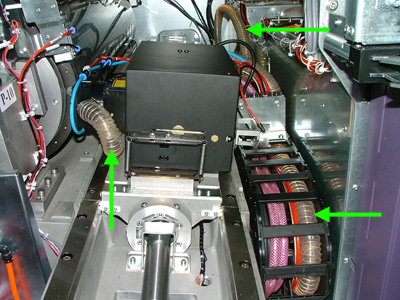
The universal debris removal cabinet (UDRC) hose extends from the thermal
head and runs along the length of the carriage. The hose exits the platesetter
on the left side and connects to the external UDRC:
A faulty UDRC hose may lead to badly exposed images and a build-up of
debris/ablasion on the carriage and V-grooves.
This procedure describes how to inspect the UDRC hose on Magnus 800.
|
|
Procedure |
|
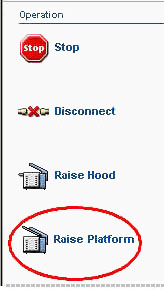
- In Magnus Controller, click Raise Platform to raise
the loading platform:
- Manually raise the unloading platform.
- Inspect the UDRC hose and check:
- Hose quality has not deteriorated.
- Hose is not twisted or folded.
- Hose is not caught on any components.
- Hose is not impeded.
- Opening the right side door of the Magnus 800
- Remove the UDRC nozzle from the head, and then activate the UDRC.
Make sure there is a vacuum.
Note: A vacuum level detector
will be installed in the EP. The detector will determine if the UDRC
is operating at the optimal vacuum level.
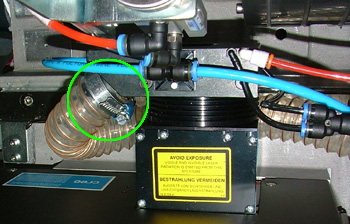
- Reconnect the UDRC nozzle to the head. Make sure the nozzle is securely
attached:
Need picture of UDRC tube to TH
|
|
Test |
|
- Expose a file and check the image quality.
- Open the UDRC vacuum detector and verify that the UDRC is functioning
correctly at the optimum vacuum level.
- Ensure that there is neither a build-up of dust or ablation inside
the platesetter.
|
|
Technical contact(s) |
|
Content owner: Yaron Shifman See the Escalation page for escalation contacts. |
Date submitted |
|
15 Feb 2005
|