Home | Contact Us | Submit Troubleshooting Info | Search | Help


    Output | Software Solutions | Proofing | Color, Screening and Calibration | Scanning | Digital Photography | Consumables | POS


Replacing the Magnus 800 drum roller


Product


Magnus® 800


Background


The drum roller ensures the plate loads smoothly onto the drum.
When the leading edge clamp (LEC) grasps the plate, the drum roller is lowered and begins to rotate.
This procedure describes how to remove and replace the drum roller.


Procedure


Removing the drum roller

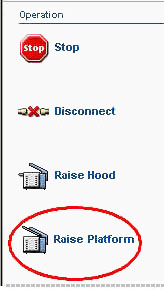
  1. In Magnus Controller, click Raise Platform to raise the platesetter loading platform:


  2. Turn off the air supply leading to the platesetter.
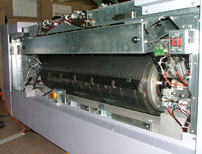
  3. Remove the upper front panel:


  4. Removing and reinstalling the Magnus 800 punch slug bin
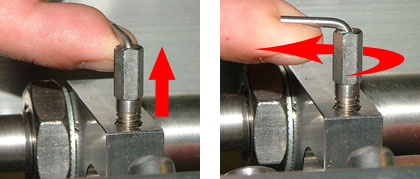
  5. The drum roller is held into place by two retractable hinges (one on each end of the roller). To raise the hinges, do the following:
    • Raise the two hinge plungers.
    • Secure the hinge plungers in their raised position, by rotating them approximately 100° in a counterclockwise direction.


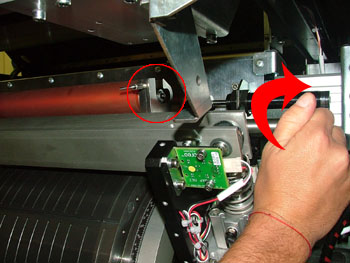
  6. Extract the drum roller from its housing:

Replacing the drum roller

  1. Place the drum roller into its housing on the platesetter.
  2. Secure the drum roller into place by rotating the raised hinge plungers in a clockwise direction until they fall into position.
  3. Removing and reinstalling the Magnus 800 punch slug bin.
  4. Open the air supply leading to the platesetter.

Test


In Magnus Controller, load and unload several plates of different size and thickness, and make sure the process runs smoothly and continuously.


Technical contact(s)
 

Content owner: Yaron Shifman
See the Escalation page for escalation contacts.

Date submitted
 

12 Feb 2006


    Copyright © 2005 Creo Inc. All rights reserved. Confidential. Back to top.