|
Product
|
|
- Trendsetter Autoloader
- Trendsetter NEWS
|
|
Machines affected
|
|
All
|
|
Component
|
|
Picker
|
|
Error
|
|
- Errors due to double-picking may include:
- Plate fly-off errors (if one or both plates are not successfully
loaded)
- Focus errors
|
|
Symptoms
|
|
- Error messages and operator suspend conditions
- Image artifacts (if both plates successfully loaded and top plate is
imaged; this should be extremely rare, but has been known to happen)
- Plate fly-off
- One or both plates have damaged leading edges (from hitting LEC
clamps or registration pins, and/or being dropped)
|
|
Cause
|
|
Plate handling/storage/environmental issues
Any or all of the following issues may cause plates to stick together,
resulting in double plate picking problems:
- Plates have burrs from being sheared or rough edges from or
mishandling, causing them to stick together at the edges. This is
especially true of thin plates (0.008 in./203µ, for example).
- Plates are removed from their box and large numbers of them are
stacked flat without slipsheets between them. This makes it more
likely that they will stick together.
- Plates have curled edges from being stored vertically or at an
improper angle. They then stick together at the edges.
- Operator pulls slipsheets out from between plates after they
are placed in the bay, inducing a static charge between plates
- Relative humidity is outside of acceptable range:
- Too high—excess moisture on plates causes them to stick
together
- Too low—increased likelihood of a static charge attracting
plates to each other
|
|
Solution
|
|
To eliminate external causes of double picking:
- Ensure that plates being used do not have have burrs or rough edges.
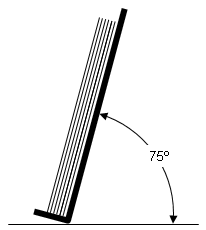
- If plates are removed from their box and stored on their edges, ensure they are stored at an angleless than 90 degrees, but not less than 75 degrees.

- If plates are stored flat, ensure that they have slipsheets between
them.
- If necessary, instruct operator not to pull slipsheets out from
between plates after placing them in the bay.
- Ensure that the relative humidity is within the range specified for
the device, or by the media manufacturer (whichever is more
restrictive).
|
|
See also
|
|
|
|
Technical contact(s)
|
|
Jack Miro
|
Submitted by
|
|
Jack Miro
|
Date submitted
|
|
09 Jun 2004
|