Home | Contact Us | Submit Troubleshooting Info | Search | Help
Output | Software Solutions | Proofing | Color, Screening and Calibration | Scanning | Digital Photography | Consumables | POS
Home | Contact Us | Submit Troubleshooting Info | Search | Help
Output | Software Solutions | Proofing | Color, Screening and Calibration | Scanning | Digital Photography | Consumables | POS
Ripro Backup (Legato) TIC - Installation Guide
Previous Page | ToC | Next Page
Enabling and Authorizing Networker
Enabling NetWorker Products
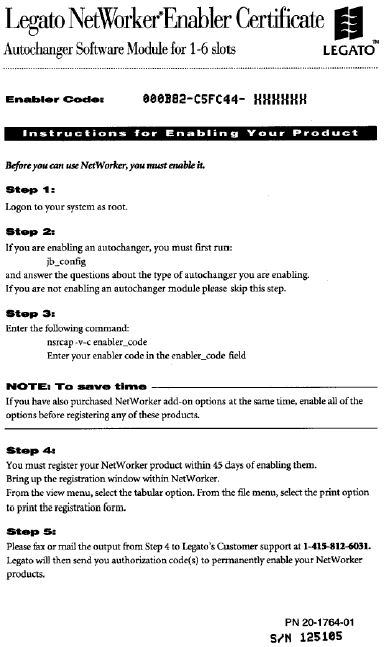
Once the installation and configuration of the NetWorker server is complete, the enabling and registration of the backup utility must also be completed. If the software is not enabled and registered within the specified time, it disables itself. The software is defined as “Evaluation” until it is enabled and authorized.
The following steps provide an overview of the enabling and registration process:
To enable the NetWorker:
This step is based on the assumption that the autochanger has been defined and configured (refer to Defining a Backup Device in Networker Installation and Configuration).
| Registration Form for Backup Utility User Fill in and fax, with a copy of each Enabling Certificate, to your local CreoScitex Service Center. | |
| Machine ID | |
| Contact Person | |
| Company | |
| Street Address | |
| City/Town | |
| State/Province | |
| Zip/Post code | |
| Country | |
| Phone | |
| Fax | |
| Modem Tel # | |
| CompuServe address | |
| Purchase date | |
| Product serial number | |
| Machine type | |
| Backup device | |
| Disk size | |
| Backup policy | |
This procedure is performed when you receive the authorization codes from the CreoScitex Service Center.
 |
Verify that the expiration date is now “null” and that evaluation marking no longer appears. |