

Home | Contact Us | Submit Troubleshooting Info | Search | Help
Output | Software Solutions | Proofing | Color, Screening and Calibration | Scanning | Digital Photography | Consumables | POS
Home | Contact Us | Submit Troubleshooting Info | Search | Help
Output | Software Solutions | Proofing | Color, Screening and Calibration | Scanning | Digital Photography | Consumables | POS
Connecting the Brisque to a Lotem
Connection between the Brisque and a Lotem
requires a fiber optic cable link or a TSP data cable link for data transfer and
a TCP/IP link for communication. |
Using Fiber Optic Cable Link (Data Connectivity)
 |
For SFL board installation refer to Installing the SFL Board in Installing an Imagesetter (43P) |
To connect the fiber optic cable link between the Brisque and a Lotem:
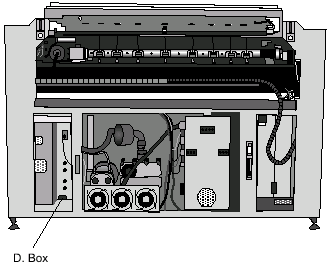
Connecting the Fiber Optic Cable Link (Data Connectivity)
Using TSP Data Cable Link (Data Connectivity)
|
For TSP board installation refer to Installing the TSP Board in Installing an Imagesetter (43P). |
To connect the TSP data cable link between the Brisque and a Lotem:
Connect the TSP data cable (Cat#504L1L670) between the TSP board on the Brisque to the data connector in the L. Box on the Lotem.
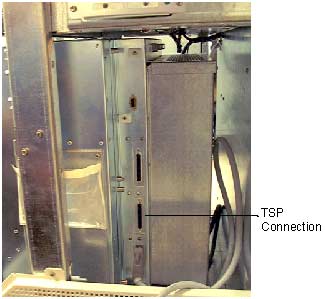
Connecting the TSP Data Cable Link (Data Connectivity)