

Home | Contact Us | Submit Troubleshooting Info | Search | Help
Output | Software Solutions | Proofing | Color, Screening and Calibration | Scanning | Digital Photography | Consumables | POS
Home | Contact Us | Submit Troubleshooting Info | Search | Help
Output | Software Solutions | Proofing | Color, Screening and Calibration | Scanning | Digital Photography | Consumables | POS
Connecting the Brisque to a Lotem
This section describes how to connect the Brisque to a Lotem, which consists of the following procedures:
 |
Connection between the Brisque and a Lotem
requires a fiber optic cable link or a TSP data cable link for data transfer and
a TCP/IP link for communication.
If you are enabling data connectivity via a fiber optic cable link, you can continue with Using Fiber Optic Cable Link (Data Connectivity) and skip Using TSP Data Cable Link (Data Connectivity). If you are using TSP cable link, proceed to Using TSP Data Cable Link (Data Connectivity) |
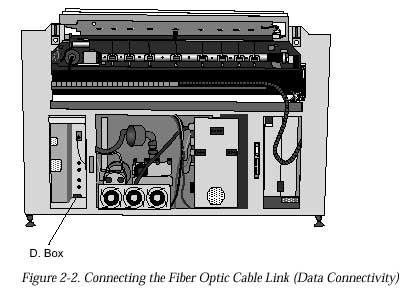
Using Fiber Optic Cable Link (Data Connectivity)
|
For SFL board installation refer to Installing the SFL Board |
To connect the fiber optic cable link between the Brisque and a Lotem:
Using TSP Data Cable Link (Data Connectivity)
|
For TSP board installation refer to Installing the TSP Board |
To connect the TSP data cable link between the Brisque and a Lotem: