Applies to |
|
- MCU for Lotem® 400
- SCU for Lotem 400
|
Priority: Next
visit
Release date: 15 Jun 2004
|
Problem |
|
The XY bar picks up more than
one plate due to a vacuum created between the plates. |
Solution |
|
- Install a paper/plate separator assembly on the front inner edge of
the cassettes.
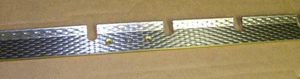
- The rough surface of the paper/plate separator assembly prevents
the creation of a vacuum between the plates.
- The top edge of the paper/plate separator assembly is bent to
help separate the plate from the paper.
- Install an air pressure regulator for the nozzle
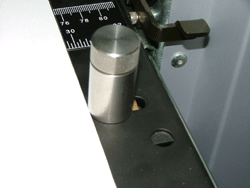
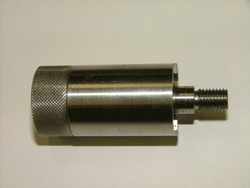
- Replace the locking knobs on the second and third cassettes. The updated
knobs prevent the last 0.15 plate in the cassette from getting stuck
underneath the knob.
Note:
- FCO 512-00139B resolves the problem for SCUs (1 cassette)
- FCO 512-00140B resolves the problem for MCUs (3 cassettes)
|
Time needed
to implement |
|
1 hour |
Parts needed |
|
FCO 512-00139B
| Part name |
Quantity |
Part number |
| Paper/plate separator |
1
|
252-05334B |
| Paper/plate separator holder |
1
|
252-05335B |
PHIL PAN HD STST 4-40*1/4"
|
2
|
380J01021 |
| PHIL.PAN HD STST 6-32*5/16" |
2
|
380J03031 |
| PHIL FLT HD STST 6-32*1/4" |
4
|
380G03020 |
| FCO utility diskette |
1
|
651-00321B |
| Speed contl. valve 6 mm |
1
|
347M25798 |
| FCO document |
1
|
719-00293B |
FCO 512-00140B
| Part name |
Quantity |
Part number |
| Paper/plate separator |
3
|
252-05334B |
| Paper/plate separator holder |
3
|
252-05335B |
PHIL PAN HD STST 4-40*1/4"
|
2
|
380J01021 |
| PHIL.PAN HD STST 6-32*5/16" |
6
|
380J03031 |
| PHIL FLT HD STST 6-32*1/4" |
12
|
380G03020 |
| Plates regulation sleeve |
4
|
252-09247A |
| Plates regulation knob |
4
|
252-08723A |
| FCO utility diskette |
1
|
651-00322B |
| Speed contl. valve 6 mm |
3
|
347M25798 |
| FCO document |
1
|
719-00293B |
|
Procedure |
|
Install
the new paper separator assembly in each cassette.
Note: It is recommended to install update 3 for the relevant Lotem
Controller version:
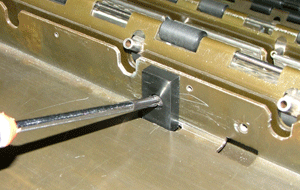
- In the MCU, remove the Phillips® screws from the two
plate stoppers on the front edge of each cassette, and then remove the
plate stoppers.
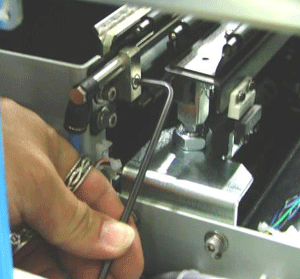
- On the outer front edges of each cassette, loosen the two hex screws
that hold the air hose.
- Install the three air regulators close to the MCU manifold.
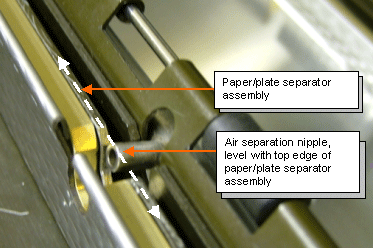
- Put the paper/plate separator assembly on the inside front edge of
the cassette, and secure it with the two Phillips screws that you removed
in step 1.
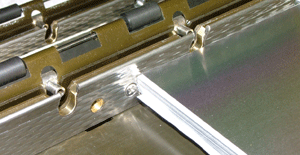
- Make sure that the air separation nipples are located in a straight
line with the top edge of the paper/plate separator assembly, and tighten
the hex screws.
- Unscrew and remove the cassette knobs.
- Install the updated cassette knobs.
- Insert the FCO utility diskette and update the registry with the Lotem
400 MCU file. For more information, see FCO Updater utility.
|
Test |
|
Load plates from each of the three casettes,
using all the media sizes that the customer uses, and verify that the
plates load smoothly.
If the plates get stuck in the metal
strip, select Loading System > Load Plate > From Cassette
to Punch Entry Stage and adjust the Y Plate High Up In
Cassette (Rel) (mm) parameter to -40 (the default
is -30). The plate is lifted 10 mm higher, and completely clears the cassette.
|
Logistics |
|
Approved quantities:
| CSC |
Qty for MCU |
Qty for SCU |
| CAM: |
22 |
5 |
| CEU: |
30 |
15 |
| CAP: |
3 |
1 |
| CJP: |
3 |
1 |
|
|
Document number |
|
719-00293B Rev C |
Technical contact(s) |
|
Mario
Amir
|
Date submitted |
|
15 Jun 2004 |

