Home | Contact Us | Submit Troubleshooting Info | Search | Help


    Output | Software Solutions | Proofing | Color, Screening and Calibration | Scanning | Digital Photography | Consumables | POS


Ripro Backup (Legato) TIC - Installation Guide

Previous Page | ToC | Next Page

Working in the Networker Environment
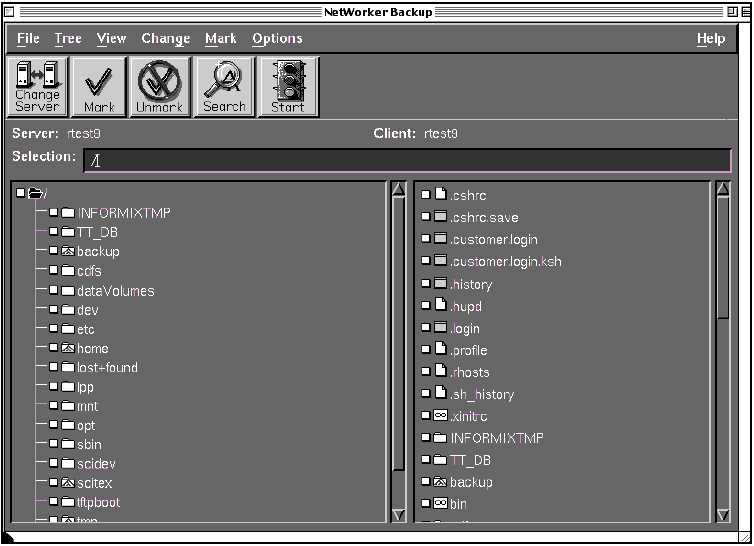
NwBackup

  1. Access the NwBackup application in the same way as the NwAdmin application was accessed. Refer to section Accessing NetWorker in Networker Installation and Configuration.

The NwBackup dialog window is now displayed.

  1. When performing the backup, only dataVolumes (file systems) and not less are backed up in order to ensure data integrity.

The file systems are marked with the following icon:

  1. From the NwBackup dialog window, select the file systems for backup.

  1. To select the filesystems, click the white square adjacent to the file system; this selects the filesystem and everything below it.
  2. To expand the file system to display all the other files below it, double click the icon, or select the icon and choose Tree from the menu bar. Then choose the level of expansion.

Previous Page | ToC | Next Page


    Copyright © 2005 Creo Inc. All rights reserved. Confidential. Back to top.