Home | Contact Us | Submit Troubleshooting Info | Search | Help
Output | Software Solutions | Proofing | Color, Screening and Calibration | Scanning | Digital Photography | Consumables | POS
Home | Contact Us | Submit Troubleshooting Info | Search | Help
Output | Software Solutions | Proofing | Color, Screening and Calibration | Scanning | Digital Photography | Consumables | POS
Connecting to DoPlate800 (E30)
 |
Doplate Connectivity is supported up to Brisque ver. 2.2. Version 2.8 does not support Doplate. |
|
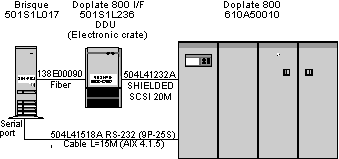
For AIX 4.1.5 the RS 232 cabling from the serial port on the Brisque to DoPlate800 has been changed to one cable Cat#504L41518A. |
Old configuration (AIX4.1.4)
| Brisque | 9pin-25pin IBM |
RS232 25P-25S L=15M Cat#504I41136 |
DoPlate800 |
New configuration (AIX4.1.5)
| Brisque | RS232 9pin-25pin L=15M Cat#504L41518A |
DoPlate800 |
Copyright (c)1998 Scitex Corporation Ltd. All rights reserved. Certain names, logos, designs, titles, words or phrases on this page may constitute trademarks, servicemarks, or tradenames of CreoScitex Corporation Ltd. or other entities which may be registered in certain jurisdictions.