Background
|
|
The objective of performing a drum speed test is to determine the drum
speed applicable to the required intensity. In the intensity test, drum
speed is constant and intensity varies. In the drum speed test, intensity
is constant and drum speed varies.
Note: Test results depend on the plate type, so this test must
be performed for each plate type that the customer uses.
|
Procedure
|
|
- Load a plate.
- Open the Lotem Calibration dialog box:
- For Lotem 400 Xpose—on the Xpose Utilities panel, double-click
LotemCalib.
- For Lotem 400—proceed as follows:
- In Brisque, on the CDE panel, double-click Devices.
- In the Output Device Handling dialog box, select Plate Setter
> Lotem > Lotem400.
- On the Operation panel, select Lotem Calibration.
- In the Lotem Calibration dialog box (example shown for Lotem Xpose),
in the Calibration Type list, select Drum Speed.
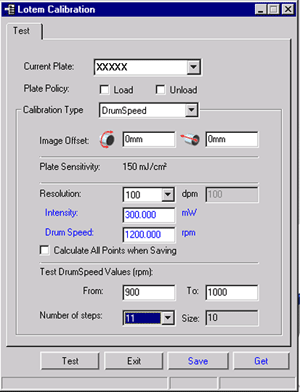
- Select the plate type:
- For Lotem Xpose—in the Current Plate type dropdown list
- For Lotem 400—in Media
- Define the Plate Policy:
- Load plate—Automatically loads a new plate before the
test begins. If you clear this option, an already-loaded plate is
used, and you can reuse a plate for additional calibration tests.
- Unload plate—Automatically unloads the plate after the
test. You must load another plate for additional tests. If you clear
this option, you can reuse the plate for additional calibration tests.
- Define the Image Offset values:
- Horizontal offset—the value around the drum in mm
- Vertical offset—the value along the drum in mm
If you use the same plate for several tests, use different offset values
for each test.
Note: The (0,0) offset coordinate is located at the upper-left
corner of the plate.
- In the Test Resolution list, select the required resolution.
Note: At this point, do not modify the value in the Drum Speed
box.
- To define the resolutions for which the intensity and drum speed values
are updated when you click Save, select the Calculate All
Points when Saving checkbox. The updated values are calculated according
to the results of the current drum speed test.
Note: To update intensity and drum speed values for the resolution
defined in the Resolution box only, deselect the Calculate
All Points when Saving checkbox.
- In the Test Drum Speed Values (rpm) area, type the values for
the drum speed range.
- In the Number of steps list, type the required number of exposures
for the drum speed values range.
The size of each step interval is automatically calculated and displayed
in the Size box.
Size of step=(To - From)/(number of steps - 1)
Note: This value cannot be modified. It is intended as a quick
reference for the Lotem operator.
- Click Test to initiate the drum speed test according to the
settings.
- Develop the plate and examine the results.
- Determine the optimal drum speed value according to the drum speed
value of the best exposure. Type this value in the Drum Speed
box.
Note: The optimal intensity value is the intensity value in which
the optimal drum speed was obtained.
- Click Save to save the new drum speed value and the new intensity
value. These values are transfered to Lotem Controller.
|

