Home | Contact Us | Submit Troubleshooting Info | Search | Help


    Output | Software Solutions | Proofing | Color, Screening and Calibration | Scanning | Digital Photography | Consumables | POS


Intensity calibration test for offset plates on ThermoFlex Mid and Narrow


Product

 
  • ThermoFlex® Mid II Hybrid With Offset Option
  • ThermoFlex Narrow Hybrid With Offset Option

(This procedure is for platesetters imaging offset plates. For flexo plates, see Drum speed calibration test (for flexo plates))


Background


The objective of this procedure is to find the optimal intensity for offset plates at a resolution of 100 dpm (or any other resolution as required).

Note: Test results depend on the plate type, so this test must be performed for each offset plate type that the customer uses. Test results do not depend on plate size.


Requirements


Procedure

 
  1. Load an offset plate.
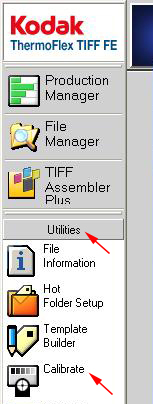
  2. In TIFF FE, from the Launch Pad, select Utilities > Calibrate.
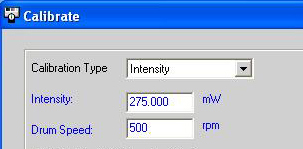
  3. In the Calibration Type box, select Intensity.


  4. In the Current Plate list, select the offset Plate that you are using.
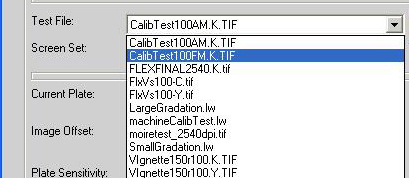
  5. Select the relevant test file according to the type of plate
    • Offset—select CalibTest100AM.K.TIF
    • Offset Staccato—select CalibTest100FM.K.TIF

  6. Define the Image offset values:
    • Horizontal offset—The value around the drum in mm
    • Vertical offset—The value along the drum in mm
    If you use the same plate for several tests, define different offset values for each test.
    Note: The (0,0) offset coordinate is located at the upper-left corner of the plate.
  7. From the Resolution list, select 100, or any other value that the customer works uses.

Note: Do not modify the value in the Intensity box at this time.

  1. In the Drum Speed box, type 500.
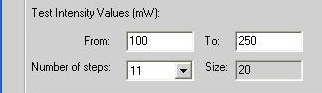
  2. In the Test Intensity Values area, define the desired intensity range in the From and To boxes.
    Note: The recommended range is 100–250.

  3. Set the number of steps to 11.
  4. Select the test files to expose, and then expose the plate.
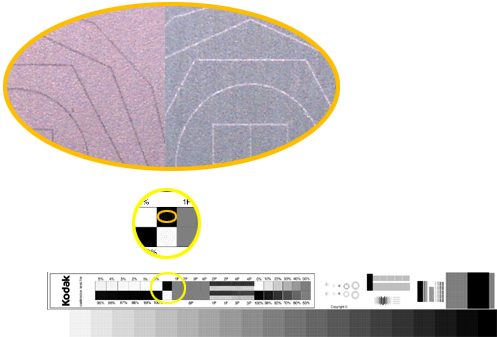
  5. Select the best intensity according to the results of the exposure. In the following picture, the intensity is correct. The black imaged lines and the non-imaged white lines are approximately the same.


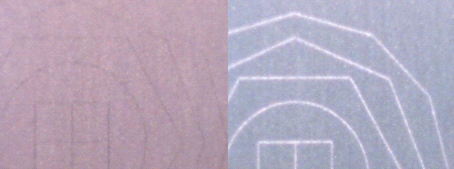
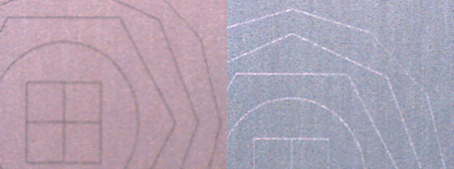
In the following pictures, the intensity is not correct.


The intensity is too low. The black imaged lines are almost invisible, while the non-imaged white lines are very thick.


The intensity is too high. The black imaged lines are very thick, while the non-imaged white lines are almost invisible.


Technical contact(s)
 

Content owner: Viki Arviv
See the Escalation page for escalation contacts.

Date submitted
 

22 Jun 2004


    Copyright © 2005 Creo Inc. All rights reserved. Confidential. Back to top.