

Home | Contact Us | Submit Troubleshooting Info | Search | Help
Output | Software Solutions | Proofing | Color, Screening and Calibration | Scanning | Digital Photography | Consumables | POS
Home | Contact Us | Submit Troubleshooting Info | Search | Help
Output | Software Solutions | Proofing | Color, Screening and Calibration | Scanning | Digital Photography | Consumables | POS
22 Jan 2007: Side-looking focus 20-watt Thermal 1.0 heads are available for use with Sword Excel More...
For customers using Sword Excel, the side-looking 20-watt Thermal 1.0 Head is available (part number 507-00263A). If customers desire a speed upgrade, a 40-watt head is available.
For full details, see FAQ: Kodak Sword Excel\Ultra and 20-Watt Thermal 1.0 Imaging Heads.
04 Jan 2007: Th1.7 head errors 17699 or 17667 occur intermittently with no apparent cause More...
If you experience head error 17699 "Laser safety loop just opened" or 17667 "HEAD: head ambient over temperature" and there is no apparent cause, see the procedure Temperature or Safety Loop errors occur intermittently with no apparent cause.
Caution : Do not attempt this procedure unless you know how to solder on electronics boards.
TechPlanet DVD Version 5 N.3—01 Nov 2006
23 Oct 2006: Updated EHR Form More...
The Exposure Head Request form (EHR) has been updated. Please delete any locally-stored copies.
See the Exposure head request (EHR) form.
25 Sep 2006: Use the artifact gallery when troubleshooting artifacts More...
If you have a new artifact, please forward plates and/or pictures, a description of the problem, a detailed solution, and any other information to Maureen Munroe.
See the Artifact gallery.
22 Aug 2006: Thermal 1/1.7 head firmware version 2.00 released More...
The latest version of Thermal 1.x head firmware, version 2.00, has been released. The following changes have been made:
Download head firmware version 2.00 from the Firmware Release page.
09 Aug 2006: Thermal 1.0 and 1.7 installation procedures have been updated More...
These procedures have been updated with new photos and updated commands. Download the latest versions here:
27 Jul 2006: Shutter replacement kit updated More...
The shutter replacement kit and procedure have been updated. Download the latest here:
04 Jul 2006: Matchprint media approved sequences and color sets More...
Customers using Matchprint media should not mix colors from the defined sets (North American Standard, High Density, or European Standard) on any proofs. Mixing the color sets, or changing the imaging sequence, causes problems with color saturation and calibration and is not supported. KCMY is the supported sequence.
For further support, contact a thermal and media specialist (RC or field).
29 Jun 2006: Updated Tilt procedures More...
The following documents have been updated to include the TH3 head:
TechPlanet DVD Version 5 N.2—01 Jun 2006
08 May 2006: Updated EHR form and procedure for ordering a replacement head More...
The Exposure Head Request form (EHR) has been updated and is now a controlled document. Please delete any locally-stored copies and link to the form on TechPlanet: Exposure head request (EHR) form.
Follow the correct procedure to get authorization and order a head ( Ordering a replacement head ).
See also Thermal head experts authorized for head replacements.
21 Feb 2006: New troubleshooting tool: Artifact gallery More...
Use the artifact gallery to troubleshoot imaging artifacts. Open the gallery and click on the type of artifact that you’re dealing with.
Please send any feedback on the gallery, including any new artifacts, to TechPlanet feedback. Send any plate samples to your PSS.
Peruse the Artifact gallery or access it from the Thermal 2 Troubleshooting page.
TechPlanet DVD Version 5 N.1 and Mature Products 2006—31 Jan 2006
08 Dec 2005: Trendsetter NEWS thermal head 1.7 to 2.x upgrade procedures for MPE and MCE More...
The new Trendsetter 800 II/NEWS MCE Thermal Head 1.7 to 2.x Upgrade Procedure was created primarily to document how to upgrade a Trendsetter 800 II-based output device with the X-speed (eXtra fast) option. However, it also applies to upgrading from a TH1.7 to a TH2 head on Trendsetter NEWS MCE-based output devices, a procedure that has not been formally documented until now.
Because this new procedure applies only to MCE-based output devices, it does not replace the existing Trendsetter NEWS TH1.7-to-TH2 Upgrade Procedure. This document has simply been renamed to Trendsetter NEWS MPE Thermal Head 1.7-to-2.x Upgrade Procedure to distinguish it from the new MCE procedure. In addition, it has been updated with the latest safety information for installing TH2 heads on MPE output devices.
Both of these documents are posted on the Procedures page.
08 Nov 2005: New TH1.0 20W, 2400 dpi head for Kodak Sword media More...
A new TH1.0 (20 watt) 2400 dpi head is available in limited quantities for use with Kodak Sword media only. The head eliminates the problems experienced by the regular TH1.0 imaging Kodak Sword plates. See the Overview page for specifications. The new TH1.0 head is not a free FCO—it is on the price list as a field upgrade:
10 Oct 2005: Thermal 1/1.7 firmware v1.99 patch More...
Download this patch only if you are running head firmware version 1.93, 1.95, 1.96, 1.97, or 1.98 and you are having focus fade problems. In firmware versions 1.93, 1.95, 1.96, 1.97, and 1.98 some customers have experienced a focus fade problem. The event happens during the second half of the plot. The image fades out and the figure of merit value goes to zero. No error is reported, so the only way to know if the focus failed is to inspect the plate or monitor the figure of merit. The firmware v1.99 patch release fixes this problem. It is available on the Downloads page.
TechPlanet DVD Version 4 N.3—30 Sep 2005
19 Sep 2005: Importance of lens cleaning and debris removal More...
Recently, some TH1.7 and TH2 heads have been returned with thick debris on the final lenses. This serves as a reminder that an effectively working debris removal system saves heads. Changes in media or exposure can result in dramatic changes in debris generation. Remember also that a dirty lens can significantly reduce power output and image quality. When troubleshooting an imaging related problem or when performing a PM, please check debris systems and final lenses. When checking the debris system, ensure that the flow marginal value is set correctly, as defined on page 4 of Debris Removal Firmware Guide-Parameter Values, Descriptions and Flowchart and that the flow rate measured by the device when the debris system is operating is above the flow marginal value. Importance of lens cleaning and debris removal contains links to some examples showing the importance of lens cleaning and debris removal and links to the TH1 and TH2 leans cleaning and debris removal procedures.
14 Jul 2005: Thermal 1/1.7 firmware v1.98 patch More...
Download this patch only if you are running head firmware version 1.93, 1.95, 1.96, or 1.97 and you are having focus fade problems. In firmware versions 1.93, 1.95, 1.96, and 1.97, some customers have experienced a focus fade problem. The event happens during the second half of the plot. The image fades out and the figure of merit value goes to zero. No error is reported, so the only way to know if the focus failed is to inspect the plate or monitor the figure of merit. The firmware v1.98 patch release fixes this problem. It is available on the Downloads page.
15 Jun 2005: Hebrew translation of MSDS for pink coolant More...
The Hebrew translation of the Material Safety Data Sheet (MSDS) for pink coolant is posted on the Safety page.
10 Jun 2005: Tilt scripts only work when using outer registration pins More...
TH1.x MCE and MPE tilt scripts only work properly if the plate is loaded on the outermost drum registration pins of 4-page, 8-page, and VLF devices. If a smaller plate is used, the correct parameter will not be adjusted and all the strips will look identical. A future release of the script will include small plate functionality. The script bundle is available on the Downloads page.
TechPlanet DVD Version 4 N.2—31 May 2005
11 Apr 2005: Air Compressors for Creo Output Devices More...
Creo output devices require clean, dry, compressed air. Air Compressors for Creo Output Devices offers guidelines for achieving specifications for air cleanliness, volume, and pressure as outlined in the Site Preparation and Requirements document for each device. This white paper is posted on the Installation and Reference pages.
07 Apr 2005: MSDS for acetone and chiller coolant More...
Material Safety Data Sheets for acetone and chiller coolant have been posted on the TechPlanet Safety page.
31 Mar 2005: Solving thermal head 1.97 firmware upgrade problems More...
The easiest way to avoid problems with the 1.97 firmware upgrade is to read the Release Notes. The cause of most problems appears to be running older versions of the firmwareupgrade.spt script, instead of the correct version (4.48 or later), and not running the MCE_TH1_upgrade_197.spt script. Careful reading of the Thermal Head Firmware Version 1.97 Release Notes will prevent these problems and result in a successful firmware upgrade.
For convenience, firmwareupgrade.spt script version 4.53 and the MCE_TH1_upgrade_197.spt script are now included in the version 1.97 firmware upgrade .zip file download. The release notes and latest 1.97 version .zip file are posted on the TechPlanet Firmware Release page.
15 Feb 2005: FAQ: Thermal Head Swath Width Adjustment More...
When Creo sells a system to a customer, the device is sold with a throughput specification. Creo is obligated to maintain this specification after the sale and installation of the device. This document is an overview of the policy regarding device specification and adjusting the swath width. This document contains competitive information that should be kept confidential to Creo. It should not be displayed or left behind at customer sites. FAQ: Thermal Head Swath Width Adjustment is posted on the Reference page.
TechPlanet DVD Version 4 N.1 and Mature Products 2005—31 Jan 2005
31 Jan 2005: Edge detect does not work after firmware upgrade More...
TH1.x firmware v1.85 and later uses focus overdrive during edge detect. If overdrive is not initialized correctly when you upgrade from an earlier firmware version, edge detect will not work. For the solution to this problem see I upgraded my head firmware, and now edge detect doesn't work on the Troubleshooting page.
19 Jan 2005: TH1.x stroke table overview More...
Since the recent firmware problem that caused stroke table corruption (fixed by TH1.x firmware version 1.97), there have been requests for more information on the usage of the stroke table. The following outlines how the stroke table is updated and used in TH1.x heads.
Each media has a corresponding stroke table. Each table is produced during stroke calibration, and the stroke table values vary with the head media settings. During production, the head is tuned for best output and the swath width is defined. The resulting stroke tables are saved using ›› stroke save. These stroke tables are never used for imaging at the customer site.
Every time the head is reset, the active stroke data is lost. Following a reset, the head only retains the saved version of the table. The stroke table for a media may appear corrupt, contain invalid data, or simply be out-of-date. However, if your stroke cal interval is set up properly, this will not be an issue. The stroke cal interval is defined by the tstk parameter, which is found in the sys parameter block on MPE devices, and in the ehi parameter block on MCE devices. The tstk parameter should be set to the default value of 540 minutes, or 9 hours, on all devices.
When tstk is set to a non-zero value, the head automatically performs a stroke calibration prior to imaging. This generates the appropriate stroke table for the current state of the head. Automatic stroke calibration will be performed periodically after that, on the interval defined by tstk. A new stroke table is generated for each media in the same way. Therefore, although a stroke table may appear invalid immediately following a reset, that table will never actually be applied to any plots. This is critical, because even stroke tables that appear to be good may be years out of date. Any analysis or troubleshooting of the stroke profile can only be done after a stroke calibration.
It is not necessary to save stroke tables during normal operation, because our active stroke tables are updated automatically and frequently. However, you can safely save stroke tables manually during testing or maintenance using the ›› stroke save command.
05 Jan 2005: Adjusting tilt on a thermal head: New procedure! More...
If you need to adjust tilt on a Thermal 1.x or Thermal 2 head, make sure you use the new tilt tool and follow the correct procedure.
For details on how to use the new tool, download Adjusting Tilt on a Thermal Head and watch the Quicktime movie: Checking tilt on a thermal head (Quicktime movie): 14MB, 400x268 resolution.
To get the tool, order the following kits:
For Thermal 2 only you need to order the following shim kits:
You also need to download the following files:
22 Dec 2004: Updated Thermal 1/1.7 diagnostic and field scripts available More...
A new Thermal 1/1.7 script bundle is available. Highlights of the new script bundle include:
tilt_mpe_th1x.spt and tilt_mce_th1x.spt were addedcalibrate_amp.spt and calibrate_calculator.spt were addedreadfocus.spt was removedFor detailed descriptions of script operation and functionality, refer to diagscripts.pdf, included in the script bundle.
Download the script bundle here: MPE/MCE Field scripts (TH1/1.7 head) or from the Downloads page.
16 Dec 2004: TH1.x Firmware Version 1.97 released to correct the stroke corruption bug More...
Thermal 1.x head firmware version 1.97 has been released. All heads running firmware versions 1.93, 1.95, or 1.96 must be upgraded to firmware 1.97 as soon as possible. Firmware version 1.97 corrects stroke corruption, which occurred on heads running firmware 1.93, 1.95, and 1.96.
Firmware 1.97 is compatible with all systems running firmware 1.93, 1.95, or 1.96. This firmware is part of the controlled release process, and controlled releases for all output devices will be finalized as soon as possible, however, it is important to upgrade to head firmware version 1.97 as a proactive measure.
To find out which devices support firmware 1.97, refer to the TechPlanet Controlled Releases page on TechPlanet. Head firmware version 1.97 is available on the TechPlanet Firmware page.
02 Dec 2004: Warning: TH1.x Firmware – Stroke table corruption occurs when switching media, causing image artifacts or banding More...
This affects Thermal 1.x heads with head firmware version 1.93, 1.95, or 1.96 and LVD hardware version 4 or later
If all of the above conditions apply, and the device has more than one media setup, when you switch media the stroke tables may become corrupted and display all 33s. This can cause image artifacts or banding.
If the device you are working on meets all the conditions above and has more than one media setup, even if you are not experiencing image artifacts or banding, complete the following workaround:
Workaround
stroke.head version. You're looking for a Thermal 1.x head with:
set head r6 0.r6 does not exist: Type set head lvreverse 0.nvs save head.The 33s in the stroke tables are active and have not been saved, so resetting the device will clear them. After resetting the device the head will perform a stroke cal automatically on the first plot as each media is selected.
A permanent solution will be rolled out in the next two weeks.
26 Nov 2004: P22 and P33 head compatibility More...
Trendsetter® 800 MPE devices support P22 heads only (for both non-Quantum and Quantum formats). Trendsetter 800 II MCE devices will accept P33 heads (for non-Quantum) and P22 heads (for Quantum).
CAUTION: A P33 Imaging head should not be installed on a Trendsetter 800 II MCE Quantum device or any Trendsetter 800 MPE device (Quantum or non-Quantum), as the write laser will not be enabled and the head will not function.
For full details see the P22 and P33 page, available from the following pages:
01 Nov 2004: TH1.x shutter scripts do not work on MCE-based devices More...
The thermal 1.x shutter replacement scripts do not work on MCE-based devices. The scripts are currently being updated to include MCE functionality.
Until the scripts are updated, when you need to replace the shutter on a thermal 1.x head on an MCE-based device, install the new shutter without running the scripts.
Note that this will affect the accuracy of >>head power sum power measurements, but the head will still be able to accurately balance the beam and image plates.
TechPlanet CD Version 3 N.3—30 Sep 2004
21 Sep 2004: New global Exposure Head Request (EHR) form More...
Make sure that you complete an EHR form for every head that you replace. The form has been simplified to make it easier for you to complete and submit. The following changes were made:
Note: It is mandatory that you complete all the fields on the form.
It is essential that you record the laser on time hours of the head that is being replaced. You can only do this before you replace the head. You must have the device turned on. Use the commands:
>> laser >>ldd info This information is used for tracking head lifetime, and may be used to set head warranties and customer expectations in the future.
Download the new EHR form here: Exposure head request (EHR) form, or on the Parts/Tools page of the Thermal 1.x or Thermal 2 TechPlanet sites (under Ordering Information).
10 Sep 2004: Return all thermal heads not installed in a device More...
Please check all sites for thermal heads. You should return any heads that:
To return a head, use the procedures on the Exposure Head page (on the Service Logistics site on CreoNet).
31 Aug 2004: Head error 17732 appears consistently with Staccato screened files from Prinergy Direct software or with files sent to Print Console More...
If the error 17732 HEAD: Unable to balance stroke to better than head bpmaxerr % appears consistently with Staccato® screened files from Prinergy Direct® software or with files sent to Print Console, you must follow the procedure in the new troubleshooting item Head error 17732 appears consistently with Staccato screened files from Prinergy Direct software or with files sent to Print Console, also available from the Troubleshooting page of this site.
31 Aug 2004: Set narrow mode parameters to the same value as wide mode parameters More...
When setting up a head, always verify that the narrow mode parameters are set to the same value as the wide mode parameters. Some heads are still being prematurely replaced because narrow mode is not correctly set up.
To further prevent this problem, it is good practice to clear the Override narrow mode check box in Print Console.
For full details see Head error 17732 appears consistently with Staccato screened files from Prinergy Direct software or with files sent to Print Console, available from the Troubleshooting page of this site.
03 Aug 2004: Thermal head experts authorized for head replacements More...
In order to maximize head life, please consult with a thermal head expert before ordering a replacement thermal head. Field and Response Center Specialists have the latest information and troubleshooting techniques to assist you in diagnosing and optimizing a thermal head to keep it operational, or to confirm that it will need replacement.
The RC Resource Planning Group (RPG) (CAM: 1-877-788-2727) can put you in contact with a specialist, or refer to the list: Thermal head experts authorized for head replacements. This is also available from the Escalation page, under See Also.
03 Aug 2004: When replacing a shutter, return the old one to Creo More...
When you replace a shutter, make sure you return the old shutter to your regional parts depot. Make sure that you include a defective parts form. Mark the package:
Defective part for investigation
ATTN: Jeff Edgar
Creo Burnaby - Kincaid
Product development analyzes the old shutters to help improve their reliability.
Download the shutter replacement procedure: Thermal 1/1.7 Shutter Sensor Replacement Procedure. Also, refer to the latest troubleshooting item: Shutter error—the focus sum suddenly drops to zero, the shutter is stuck, or you see error message [17686] HEAD: LV Not enough light for beam balance.
15 Jul 2004: Troubleshooting a stroke clock/IMAGING fault More...
A small percentage of MPE devices are susceptible to noise on the stroke clock. Due to error checking on the stroke clock and IMAGING signals (added in firmware version 1.93), this noise may cause plot failures.
The error message in these cases is:
Stroke Clock or Imaging signal fault, check LC-BP cable or Stroke Clock fault (bipolar) (error number 17696 on the MPE platform, and error 44996 on the MCE platform).
To diagnose the source of the error, use the following procedure:
>>set head maskflt 1>>mask range
>>set head r4 1maskflt or r4 back to 0.
For full details, see section 8.4 in Thermal 1.x Firmware Patch V1.96 Release Notes .
Note that an error is reported when a stroke clock or IMAGING cycle is incorrect or missing. In most cases, checking and replacing the cables and cards should remove the error condition. If there is too much noise on the cables, though, the error may persist. In these cases, loading firmware patch 1.96 and masking the fault will allow the device to continue plotting.
If you choose to mask the fault, the site should be closely monitored for quality, and a plan should be developed to properly fix the signaling issues.
For more detailed information about the firmware patch, see Thermal 1.x Firmware Patch V1.96 Release Notes . Download the patch from the Downloads page of this site.
22 Jun 2004: Always reset NVS parameters after testing More...
Two common parameters that are changed during remote or onsite work are hdp lrt and sys tstk. Please be sure to restore these settings to their proper values (lrt = 180 and tstk = 540) and save them when you are finished troubleshooting (use the command >>nvs save hdp to save the lrt value; >>nvs save sys to save the tstk value).
These NVS settings can cause image artifacts and other errors if left set incorrectly.
TechPlanet CD Version 3 N.2—14 Jun 2004
14 Jun 2004: Downgrading the Thermal 1.x Head Firmware or LCA Bundle May Cause Errors More...
There has been a re-design of the TH1.x Light Valve Driver (LVD) board. Testing shows that the new board functions identically to the old boards, and the change should be largely invisible. Unfortunately, the new board does not support all versions of head firmware, or of the head LCA bundle. To function properly, the head must be running firmware V1.93 or higher, and it must have the LCA bundle lca_bndl.hex installed (lcav105.hex, lcav103.hex, and older bundles will not function). If you receive a head with the new board, you must not downgrade the firmware or LCA bundle.
If you downgrade to firmware V1.83 or older on a head with the new board, problems may include:
If you load LCA bundle lcav105.hex or older on the head, you will see the error message:
LV LCA not initialized
In both cases, the solution is to upgrade to head firmware V1.93+ and lca_bndl.hex. For instructions on loading firmware, or for firmware versions, refer to the TH1.x firmware page on TechPlanet.
To determine if your head has the new board, type head version and look for LVD hardware version:. The new LVD board will be version 2 or version 6.
10 Jun 2004: New Thermal Head naming convention More...
As of May 21st 2004, each TH2 head that passes through Production (new and RMA) will have an NVS field parameter called sys comment, which is populated with the part number and description of the head. This will help you identify the head when troubleshooting or ordering a replacement. This process will start with Thermal 2 heads, but a similar method will be implemented for TH1.x at the next firmware release.
The naming scheme consists of:
Part number | THgeneration.diode indicator | resolution | channels | screening criteria and proofing descriptor
For full details, refer to Invalid Key, which is also available from the Reference page of this site.
27 May 2004: Change to the shutter replacement kit (05-0165) More...
Due to a possible delay when shipping acetone, the lens cleaning kit (part number 04-0012B) is no longer part of the shutter replacement kit (part number 05-0165). In order to ensure the shutter kit arrives as quickly as possible, the lens cleaning kit should be ordered separately. As a reminder, SAP will automatically prompt to order the lens kit (04-0012B) whenever a shutter kit (05-0165) is ordered.
Download the latest procedure here: Thermal 1/1.7 Shutter Sensor Replacement Procedure or from the Procedures page of this site.
21 May 2004: Updated TH1.x MCE scripts posted More...
The Thermal 1.x MCE/MPE script bundle has been updated in response to a change in MCE firmware. The parameter swidth was moved to hdm and, as a result, the following scripts were updated:
Note: The scripts included in this bundle are both MCE and MPE compatible.
Download the script bundle here: Invalid Key or from the Downloads page of the Splot TechPlanet site.
04 May 2004: Shutter error—the focus sum suddenly drops to zero, the shutter is stuck, or you see error message [17686] More...
A new troubleshooting item has been posted that describes how to diagnose a shutter problem where the focus sum suddenly drops to zero, the shutter is stuck, or you see error message [17686] HEAD: LV Not enough light for beam balance . The solution is to replace the shutter.
For full details, refer to Shutter error—the focus sum suddenly drops to zero, the shutter is stuck, or you see error message [17686], available from the troubleshooting page of this site.
01 Apr 2004: Configuring narrow mode and wide mode parameters on Thermal 1.x heads More...
When you configure a Thermal 1.x head, always set up the device so that it will image to the highest quality print that it is licensed for and that is supported by the device and media combination, regardless of what the customer is currently imaging. For example, if a Quantum device and media combination is sold as being capable of imaging Staccato 20, then the device should be set up to do Staccato 20, even if the customer is currently printing 175 LPI.
Also note that you should not try to image a level of Staccato® screening finer than what the media and device combination has been qualified for. For example, a device may be capable of and licensed to image Staccato 20, but you should not try to get LN-NI to work at Staccato 20 because it is only qualified for Staccato 35.
As always, make sure that the narrow mode and wide mode parameters are set to have the same value.
For more details, refer to Appendix B: About Narrow Mode in Troubleshooting Staccato On-Plate.
02 Mar 2004: Some commands may cause problems in TH1.x heads with V1.93 head firmware More...
A small problem has been discovered in V1.93 head firmware. When you access certain head functions, the head may lose track of the correct stroke width and stroke offset.
head nvs command is affected.plot < pattern > exposure, plot flatten, and plot phase are affected.The affected commands still function properly, and all head NVS parameters are retained; however, banding may occur on plots. Resetting the head clears the problem. You can make and save any changes before resetting the head, and those changes will be retained (this is because the head will continue to function and handle parameters properly).
Note: None of these commands are used during normal device operation.
In addition to the above commands, on Trendsetter VLF Autoloaders running firmware version 2.28 or higher, we may see banding following automatic stroke calibration, so we recommend against upgrading heads installed on this platform. New or replacement heads with V1.93 firmware may be installed on VLF Autoloaders; however, to avoid banding you should check that the following parameters are set correctly:
swidth, soffset, swidthn, and soffsetn values should be set to the same value for all hdm slotshead.r10 should be set to the same value as hdm < index >.swidthhead.r11 should be set to the same value as hdm < index >.soffsethead.r12 should be set to the same value as hdm < index >.swidthnhead.r13 should be set to the same value as hdm < index >.soffsetnThis problem will be fixed in the next release of TH1.x firmware.
For more details about how the head and host handle NVS parameters, refer to the TH1/1.7x Head Firmware Summary.
17 Mar 2004: KPG Sword and Sword Excel and 20-Watt thermal imaging heads: Upgrading sites to 40-Watt heads More...
KPG® Sword™ and Sword Excel™ media are no longer qualified on Output devices equipped with 20-Watt thermal 1.0 heads. This imaging combination has produced random focus artifacts and focus errors on many beta test sites. Devices equipped with 40-Watt Thermal 1.7 heads, Thermal 2 heads, or Fiber heads, are qualified (as per the media spreadsheet) and will work well with the Sword and Sword Excel media.
There should be no new installations of this media on devices with 20-Watt thermal 1.0 imaging heads (for full details refer to FAQ: Kodak Sword Excel\Ultra and 20-Watt Thermal 1.0 Imaging Heads).
Note: The FAQ is not to be read by customers as it may contain confidential information.
For the known sites still using Sword and Sword Excel media (List of existing customers: Sword Excel and 20W Th1.0 heads), possible alternatives are:
Creo will inform them if an alternate solution becomes available. For sites wishing to upgrade to a 40-Watt head, use the following procedure: Invalid Key. This document may be shared with the customer.
16 Mar 2004: How to properly replace the shutter sensor More...
For the correct procedure to replace a broken shutter sensor, download Thermal 1/1.7 Shutter Sensor Replacement Procedure.
Tips:
TSTK value using the command >>set sys TSTK. If the value is 0, set it to the correct value of 540 using the command >>set sys TSTK 540Send all broken shutters to Jeff Edgar at:
4225 Kincaid Street
Burnaby, B.C.
Canada V5G 4P5
20 Feb 2004: Thermal 1.x Head Firmware V1.93 Released More...
Thermal 1.x head firmware version 1.93 has been released, and is available on the TechPlanet Firmware page. This firmware is part of the controlled release process, and should only be installed on devices that support it. To find out which devices support V1.93 head firmware, refer to the controlled releases page on TechPlanet.
The primary changes in V1.93 include:
swidth, soffset, swidthn, and soffsetn from the HEAD parameter block, to the HDM parameter block. This allows you to use media with different stroke settings on the same head.For full details, refer to the V1.93 release notes.
TechPlanet CD Version 3 N.1/—16 Feb 2004
03 Feb 2004: Emissions and Ventilation FAQs More...
Frequently-asked questions (FAQs) about emissions and ventilation related to imaging of thermal media have been compiled. The document is intended for both Creoites (sales and service) and customers.
Download the FAQ here: FAQ: Emissions and ventilation related to imaging of thermal media or from the Debris Removal Reference page.
09 Jan 2004: Alert! Bug found in Th1.x head Firmware V1.92 - affects MCE devices only More...
There is a bug in V1.92 that impacts MCE devices. This firmware should not be loaded at new sites.
fheadcal value. MCE sites already running V1.92 can continue to do so, but they should be aware of the limitation.For more information, refer to the Thermal 1 Firmware Release page.
05 Jan 2004: Sword Excel No Longer Qualified on 20 Watt Thermal 1.0 Heads More...
Due to image artifacts and focus errors on Sword Excel plates imaged with 20W Thermal 1.0 heads, Sword Excel will no longer be installed on any 20W devices. Devices with Thermal 1.7 40W or TH2 thermal heads should have no problems with this media.
With agreement from KPG, only sites that already have Sword Excel installed will continue to receive support. The list of these sites, as well as an interim solution for focus problems at these sites, is listed on the Sword Excel media page.
Refer to the following:
04 Jan 2004: Thermal 1.x Head Firmware V1.92 Released More...
Thermal 1.x head firmware version 1.92 has been released, and is available on the TechPlanet Firmware page. This firmware is part of the controlled release process, and should only be installed on devices that support it. To find out which devices support V1.92 firmware, refer to the controlled releases page on TechPlanet.
The primary changes in V1.92 include:
Refer to the V1.92 release notes for further details.
29 Sep 2003: Always check the head tilt when troubleshooting imaging problems or installing a new head More...
Accuracy of tilt is critical for FM jobs. When you’re installing a head or when you’re diagnosing banding on-plate, make sure that you check the tilt and adjust it if necessary.
To check the tilt (all thermal heads):

Refer to the Thermal 1 or 1.7 installation procedure for details:
Note: Tilt is not adjustable on Thermal 2 heads. Contact your regional specialist if you find a tilt problem on a Thermal 2 head. See the related troubleshooting item.18 Sep 2003: Air Jet Plate Field Upgrade Kit Now Available More...
It is important to prevent debris accumulation on the final lens of a TH1.x head. If you have a device that cannot accept a debris removal cabinet (part number 02-4468A), install the air jet plate field service upgrade kit (order part number 512-00059A) to minimize debris accumulation.
For the air jet plate installation procedure, download the Air Jet Plate Installation Procedure, or refer to the Installation page of the Debris Removal site.
TechPlanet CD Version 2 N.3/4—15 Sept 2003
15 Sep 2003: New Media Setup Procedure and Staccato Troubleshooting Guide More...
New procedures have been written for setting up media, and for troubleshooting Staccato® on-plate. For full details, refer to this week's Product Support Newsletter.
06 Aug 2003: How to troubleshoot head error 17506 - HEAD: unsupported message More...
If you receive the following error: 17506 - HEAD: unsupported message, try the following procedure:
lsrmode) to the default of 0. This is the supported value. Use the following commands:>>set head lsrmode 0
>>nvs save headFor details refer to the troubleshooting item: Error 17506 - HEAD: unsupported message. This has also been published to the Troubleshooting page of this site.
06 Aug 2003: Lens Cleaning Update: Key switch location More...
If you're working on a device that has not been upgraded to FCO E040, you will need to make sure that the key switch is properly bolted to the device.
For further details, refer to the TH1/1.7 Lens Cleaning Procedure (77-0125A).
24 Jul 2003: New! Cleaning Kit for the Final Lens More...
It is important to ensure that the final lens is clean before swapping out a head because debris build-up can cause a serious reduction in both image quality and power output from the head. A high percentage of heads returned with image quality issues have not had the final lens cleaned, and this costs Creo unnecessary money.
A new lens cleaning kit (Lens cleaning kit: 04-0012B BOM) is now available that will make lens cleaning easier. It includes:
Ordering tip: Because of the relatively high cost of shipping this kit, it is most cost-effective to order the kit in multiples of three.
Refer to the Lens Cleaning FAQ for more information. Also, make sure you download the latest TH1/1.7 Lens Cleaning Procedure (77-0125A).
02 Jul 2003: scnarrow.spt and soffsetn.spt are no longer required for setting up Staccato More...
The two scripts scnarrow.spt and soffsetn.spt are no longer required when setting up Staccato. They are listed on the Downloads page for archive purposes only.
For further details, refer to: Troubleshooting Staccato On-Plate
10 Jun 2003: Ordering Heads Using the EHR Form More...
When ordering a thermal head, make sure you fill out the EHR form completely, including a detailed description of the problem, the number of hours on the head, and the level of Staccato® the customer is using (if applicable).
Also, please be sure to consult a Thermal PSS (or another authorizing engineer, if a PSS is unavailable) before deciding to replace the head.
In cases where the problem is due to imaging artifacts, always include a plate or proof sample, and, when applicable, a Press sheet sample with the shipment.
Providing as much information as possible saves valuable time when the order is processed and increases the likelihood of us finding the cause of the failure. The future success of this product relies on the information that you provide us today.
Download the latest form here: Exposure Head Request Form.
27 May 2003: Alert: Shutter Production Fault More...
There is a strong possibility that many shutters on the 1.x Thermal Head series have been manufactured so the shutter itself extends out past the focus block/airjet block.
This is not a huge issue for devices without debris removal. However, on devices equipped with debris removal and/or a tick killer plate, the clearance between the plate and the shutter may not be sufficient.
This will cause the shutter to potentially stick open, stick closed, or not operate smoothly. In turn, this could produce edge detection problems and imaging artifacts.
The procedure for correctly installing and aligning a shutter in the field is described on page 13 of Thermal Head 1/1.7 Shutter Sensor Cleaning or Replacing (719-00028A-A).
Current production stock and heads have been corrected at the factory. However, the number of faulty heads that made it to the field has not been accurately determined.
If Response Center staff suspect a shutter problem, instruct the field person going to the site to first check for this fault.
22 May 2003: New Escalation Process for Head-Related Problems More...
The Thermal head escalation page on the TechPlanet has been updated. This includes:
These changes have been made in coordination with the revisions to the global escalation procedure.
Please note that the changes are not meant to deter field support staff from contacting PD support staff if they are unable to get assistance within their CSC. If you require an answer to question to facilitate better and faster service to our customers, then you should contact whatever resources are at your disposal to get that answer quickly. However, if you require a product fix or a significant amount of time from a PD resource, a formal escalation will be required.
Refer to the Escalation page for more details.
22 May 2003: New TH1.x MCE/MPE Splot script posted More...
The Splot scripts included in this zip file are both MCE and MPE compatible, and replace the current MPE-only scripts. The original code for the MPE has not been altered, so the end user should not notice any difference in the operation of the script except for a 10 second delay in the start-up where the script attempts to discern the host type. The TH1.x MCE Splot script has been posted to the downloads page of the Splot site.
15 May 2003: Head Tilt and Banding on Staccato® or High-LPI Jobs More...
Tilt is critical when trying to image Staccato or high-LPI jobs. If it is incorrectly adjusted it may cause banding.
To check the tilt:
Whenever you replace a head, or install a new head, you should check the tilt. If you have recently replaced or installed a head, and the site is experiencing banding, you should consider checking the tilt.
For more detail, refer to section 7.2 of the Thermal 1.7 Head Installation Procedure, or section 7.2 of the Thermal 1.0 Head Installation Procedure. These documents are also available from the Installation page of this site.
TechPlanet CD Version 2 N.2—28 Apr 2003
31 Mar 2003: Thermal Config Files Back Online More...
The Thermal Config Files are now back up-to-date. View the latest via the Control/Settings page, or directly via the Thermal Config Files.
25 Feb 2003: Updated Thermal 1.x Planned Maintenance More...
The Thermal 1.x Planned Maintenance Procedure has been updated to be easier to use. Please direct your feedback about the new format to Maureen Munroe.
View the new Planned Maintenance Procedure, or access it from the Maintenance page of this site.
05 Feb 2003: Bad hotlink cable (10-4968B or 10-3518B) can cause plot problems on TS VLF More...
An incorrect bend in the hotlink cable can cause plot errors on TS VLF devices. Symptoms include no plotting on plate, and no error messages. When first troubleshooting a plot problem, replace this cable before replacing the backplane.
For more details, refer to the troubleshooting item: Bad hotlink cable (10-4968B or 10-3518B) can cause plot problems on TS VLF, available on the Troubleshooting page.
03 Feb 2003: Bug Found in ServiceShell 'download' Command More...
This bug occurs when you use ServiceShell to load Th1.x firmware on MCE devices. When you use the 'download' command to load Th1.x firmware on MCE devices, the head type parameter is set to 0 and saved. This setting may be incorrect.
This bug will be fixed in ServiceShell V2.4, SP1, scheduled for release in mid-February.
27 Jan 2003: Setup and Tuning for Staccato: Updated Procedure More...
The TEH: Setup & Tuning for Staccato document has been updated to include more explanation on the differences between AM and FM screens, and to provide instructions for MCE- and MPE-based devices.
Download it from the Procedures page of this site.
27 Jan 2003: 32-4090C Head has been Replaced by 32-4182A More...
The 32-4090C head is being replaced with the 32-4182A head, which has the high speed LVD board in it. This will apply to RMA and new heads. Note that the new head has the same functionality as the older one, and can be used in a larger variety of platforms.
For further information, refer to Heads by Part Number, available from the Parts/tools page of this site.
TechPlanet CD Version 2 N.1—24 Jan 2003
21 Jan 2003: Updated Thermal 1/1.7x installation and service documentation posted More...
The following documents have been updated:
15 Jan 2003: Thermal 1.x Head Firmware Version 1.83 Released More...
Thermal 1.x head firmware version 1.83 has been released for all CTP devices. Highlights of this release include:
30 Dec 2002: Updated Thermal 1/1.7x Head Firmware Summary posted More...
The updated Thermal 1/1.7x Head Firmware Summary, with information on the MCE Head has been posted on the Reference page of this website.
05 Dec 2002: Missing a partial swath More...
On VLF devices that have a 1.x thermal head, an error has been reported where part of a swath is missing on the plate, and a full swath may also be missing. This occurs randomly during a plot and may require replacement of the LC-BP and the coaxial (hotlink) cables. For details of the problem, see Missing a Partial Swath.
04 Dec 2002: Reminder: Remove the DHU prior to replacing a head More...
If you need to swap out a head, make sure you remove the DHU from the old head and install it on the new head.
02 Dec 2002: Updated Th1/1.7 Field Scripts Posted More...
Two scripts, readdiagmem.spt and focusdiag.spt, have been improved to run in 15 minutes or less. Also, contrast.spt has been added to the bundle. For details, refer to the the supporting documentation (diagscripts.pdf, included in the bundle, or availble here: Running and Interpreting Thermal 1.x Diagnostic Scripts) for details. New bundles have been posted for Intel and Alpha to the downloads page of this site.
23 Nov 2002: Link to Qualified Plate Media Status/Compatibility Spreadsheet posted More...
Links to the Qualified Plate Media Status/Compatibility Spreadsheet have been posted on the Connectivity, Reference, and Troubleshooting pages of this website.
23 Nov 2002: Thermal Head Maintenance Course Student Guide posted More...
The Thermal Head Maintenance Course Student Guide (07-0023A) has been posted on the Reference page of this website.
15 Nov 2002: Do not change the DHU filter if it looks yellow More...
Note that you do not need to change the filter component of the Dehumidifier Unit (DHU) if it appears mottled yellow in color. This is the normal color of the filter (refer to the photo below for an example).
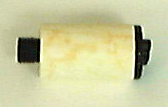
The filter needs to be changed if there are any visible signs of contamination in the filter bowl, or during a regular Preventative Maintenance.
Also, remember that if the switch on the DHU changes from green to red, you must replace the entire unit. For more information refer to the Parts/tools page.
04 Nov 2002: How to create series with workstation plots More...
Refer to the following procedure: Creating Series with Workstation Plots, or download it from the Troubleshooting page.
01 Nov 2002: New Head Firmware Version 1.82 Released on ECO CA00029 More...
Thermal head firmware version 1.82 is a new release of head firmware.
TechPlanet CD Version 1 N.4—26 Oct 2002
24 Oct 2002: New Staccato Troubleshooting Tips More...
For tips on how to troubleshoot Staccato, refer to the following document: Troubleshooting Staccato On-Plate, or download it from the Troubleshooting page of the Media site.
24 Oct 2002: P33 Thermal Imaging Head Released More...
The P33 Creo Thermal Imaging head replaces the discontinued Entry Imaging head. P33 heads are available in both Thermal 1.x and Thermal 2 formats. All Entry Imaging heads have already been upgraded.
16 Oct 2002: Updated Th1.x Field Scripts Posted More...
Two scripts, mpeupld.spt and upload.spt, have been removed from the bundle. Refer to the the supporting documentation (diagscripts.pdf, included in the bundle) for details. New bundles have been posted for Intel and Alpha to the downloads page of the Splot site.
03 Oct 2002: CORRECTION: Change to the Beam Position Sensor More...
The item dated 24 Sep 2002 should read Change to the beam position sensor, not the beam balance sensor. The news item has been updated to reflect this error.
24 Sep 2002: Change to the Beam Balance Sensor More...
A modification has been made to the beam position sensor assembly to eliminate the possibility that the blockers might move into the path of the laser light and cause imaging artifacts. As well, the diameter of the blocker screws has been increased from an M3 to an M4 so as to block out more of the leakage light.
Beam blockers installed in all new and RMA heads will include a locking sleeve to securely hold the beam blocker screw in place. In order to adjust these blockers in the field, you will first have to loosen this locking sleeve.
Refer to the detailed procedure on positioning the beam blockers, available from the Procedures page of the Thermal 1/1.7 TechPlanet site.
At this time, the only way to distinguish between the new and old versions is to insert the Phillips screw driver and try it. Alternatively try the 2mm Allen key. If the 2mm fits, it will be tight and will require that you loosening the locking sleeve.
Note: The old version uses a small flat blade screw driver, and the blockers should move easily.
This applies to all new and RMA'd TH1.7,TH1.0 and DOP heads.
24 Sep 2002: REMINDER: Perform Thermal 1/1.7 Preventative Maintenance Annually More...
Preventative maintenance should be performed on each head once a year. A good strategy is to work it into a regular service call or regularly scheduled device PM. Download the document from the Procedures page of the Thermal 1/1.7 TechPlanet site.
Some key advantages of regular head maintenance are:
10 Sep 2002: DHU Update More...
We would like to thank everyone for their ongoing efforts to convert all Thermal 1.x-equipped devices from Desiccant systems to the DeHumidification Unit (DHU).
19 Aug 2002: Determining If a Th1.x Head Can Accept a Debris Nozzle More...
A new field service guide has been posted to help you determine whether or not the Th1.x head you're working with can accept a debris removal nozzle. Download the document Determining If a Th1.x Head Can Accept a Debris Nozzle , or find it on the Procedures page of this web site.
01 Aug 2002: Th2 vs Th1.x Monitor Commands and NVS Parameters More...
A new reference document has been posted that compares Thermal 2 and Thermal 1.x monitor commands and NVS parameters. Download the document Th2 vs Th1.x Monitor Commands and NVS Parameters , or find it on the Reference page of the Thermal 2 web site.
22 Jul 2002: Interface Drawings (1/1.7) More...
Current drawings showing focal plane position and center of gravity with respect to physical mounting features have been posted on the Drawings and Photos page.
TechPlanet CD Version 1 N.2/3—12 Jul 2002
02 Jul 2002: Controlled Releases and Thermal 1/1.7 More...
The first Controlled Release CDs are now available for a number of output devices. A Controlled Release is a package of software/firmware components that have been tested for compatibility with each other and with the device hardware. All machines should be upgraded to the latest controlled release version according to the priority of the controlled release ECO. Thermal 1 or 1.7 firmware is included in a controlled release. For details, refer to the Control/Settings page of the All CTP Devices website.
05 June 2002: Laser Safety Bulletin More...
Please read the Laser Safety Bulletin for Trendsetters to be reminded of the possible dangers of working with an active laser. This bulletin also explains the correct use of the safety interlock override (SIO) keyswitch.
15 May 2002: Caution! Wear a Static Strap When Handling Thermal Heads More...
Electro Static Discharge (ESD) has been responsible for an increasing number of preventable head failures. You must ensure that you are properly grounded when handling thermal heads, power supplies, or any of the electronics in the devices. Also, you must have your static straps periodically tested or replaced to ensure they are functioning properly. Remember that the effects of ESD are not always immediate and are not detectable until the failure occurs.
It is important to guard against ESD when removing failed heads because these heads are sent for repair and refurbishment and are eventually sent back into production. Many of the problems that these heads can experience are a result of previous damage from improper handling.
Always ensure that you are properly grounded when handling thermal heads, power supplies, or any of the electronics in the devices.
22 Apr 2002: Updated Th1.x Field Scripts Posted More...
New versions of the media setup scripts (slope, curve, wpower, sd and ds series) have been added to the Thermal 1/1.7 Field Scripts Bundle. These versions fix a bug that caused the scripts to crash during startup when used with newer versions of Splot or if mask range was on. Download the latest version of the scripts from the Splot Downloads page.
05 Apr 2002: Reminder: Banding On KPG Matchprint Black With FM Screens Is Normal More...
It is normal for some banding artifacts to occur on Black media imaged with Staccato screens. This is an inherent problem due to an interaction between our thermal head and Matchprint media. Refer to the PSU for more information.
05 Apr 2002: Head Firmware Version 1.80 Released on ECO E315 More...
Thermal head firmware version 1.80 is a controlled release of head firmware. Only install this version on those output devices that support it. This firmware version supports Entry-level devices, and stores statistics by head media in the new hms parameter block in the head. Find out more from FCO E315.
Note: Installing head firmware version 1.80 requires Splot version 2.84 or higher. Refer to the Downloads page of the Splot site.
27 Mar 2002: Verifying Power on Plate More...
After determining the correct exposure using the information in the appropriate media technical note, it is good practice to verify that the exposure obtained is reasonable.
Confirm that the power at the shutter reasonably matches the power on plate value from the CTP Media Imaging Performance Database.
To confirm the power, use one of the following methods:
>>head power sum. This only applies to heads shipped from Vancouver with firmware version 1.56 or greater. Older heads upgraded in the field may not have shutters calibrated to provide accurate results with this method. Check the thermal config file for verification.>>head power full. This may give a meaningful result, although its accuracy lacks precision and will decrease as debris builds up on the lens.27 Mar 2002: Reminder: Replace Desiccant Boxes with a Dehumidifier Unit (DHU) More...
Summer is fast approaching and with it comes an increase in service calls associated with higher temperature and humidity levels. With this in mind, we are continuing the campaign to have all systems upgraded to include a DHU (see ECO E453 for details). The correct part number to order is 05-0244 (05-0243 for TFX devices). Refer to PSU Vol 6,Iss 6 for more information.
21 Mar 2002: DHU Installation Procedure Updated More...
The DHU Installation Procedure has been updated. This includes corrections the VLF and TFX wiring instructions. Download the latest Dehumidifier Unit (DHU) Installation Procedure from the Installation page.
19 Feb 2002: Troubleshooting an Edge Detect Error or Subscan Shift More...
If you encounter errors such as failure to detect edge of the plate, or image shifting randomly in the subscan direction, there is a new troubleshooting item posted to the Troubleshooting page of this site. You may also be getting “Focus error detected at X inches” or “Unable to learn focus” errors. Refer to the troubleshooting item for more detail.
Technical Library CD Version 1.1—15 Feb 2002
08 Feb 2002: Manual Head Firmware Upgrade Procedure Posted: Caution!More...
To simplify head firmware upgrades, and minimize the risk of NVS corruption, an automated upgrade script is bundled with each release of head firmware. In all cases, this is the recommended method of upgrading head firmware, as it reduces the risk of NVS corruption substantially, and provides thorough backups in case problems arise. In very rare cases, a manual head firmware upgrade may be required. It is vital that the whole procedure be followed in its entirety, otherwise serious corruption way result. For more information refer to the latest issue of the PSU.
08 Feb 2002: Avoid Unnecessary Head Replacements More...
Avoid unnecessary firmware-related head replacements by checking the "Common Problems and Solutions" section (section 7, page 6) of the TH1/1.7x Head Firmware Summary, available on the Control/Settings page under Configuration.
31 Jan 2002: New Navigational Structure More...
This site has been restructured to fit TechPlanet’s common navigation. Please take a few moments to familiarize yourself with the new structure. If you have any questions or comments about the navigation, please email Dina Davidson.
15 Jan 2002: Splot Site on TechPlanet More...
Follow the link to the Splot Home Page. From there you can download the latest Splot Installer, Installation Guide, and Upgrade, as well as the latest ServiceShell Downloads.
17 Dec 2001: Field Script Bundles have Been Updated More...
The Field script bundles for both Intel and Alpha machines have been updated. Several changes were made to the new bundle, including:
12 Dec 2001: Parameters Change when Loading or Upgrading Head NVS More...
Problem: nvs upgrade head
nvs load < subsystem> does not save the changes, so the parameters will be restored to their original values on reset. However, nvs upgrade head
Refer to the associated troubleshooting item for more information.
10 Dec 2001: DHU Kit Update More...
When ordering the DHU Kit please use the new part numbers:
24 Oct 2001: Replacing the Filter in the DHU More...
The filter in the DHU needs to be replaced ever year as part of the regular Head preventative maintenance. Note the filter should be replaced anytime fluid or moisture is noticed in the bowl. If there is fluid in the bowl you must check the differential pressure indicator. If it is red, the device has been tripped and you will need to replace the entire DHU. If it is green you only need to replace the filter. Download the Thermal 1.x Exposure Head Preventative Maintenance for more information.
23 Oct 2001: How to Upgrade Firmware in a Lotem Quantum
A new procedure has been posted that describes how to upgrade firmware on a Lotem Quantum using Service Shell. Download the following procedure:
TEH II Downloading Firmware for a Lotem Quantum), available from the Thermal II Splot page.
Technical Library CD Version 5.4—23 Oct 2001
22 Oct 2001: Splot 3.34d Upgrade Posted
Splot 3.34d provides improvements in remote data transfer from the head when troubleshooting remotely. Note that if you have Service Shell installed, you must upgrade Splot to the latest version. To upgrade to version 3.34d, download the following procedure:
TEH II Splot 3.34d Upgrade Procedure), available from the Thermal II Splot page.
22 Oct 2001: Splot Downloads Now Available
Follow the sidehead link to the Splot page. From there you can download the latest Splot Installer, Installation Guide, and Upgrade, as well as the latest ServiceShell Downloads.
18 Oct 2001: New Maintenance Procedures Posted
Four new Thermal II procedures have been posted to the Procedures page:
18 Oct 2001: New Procedure: Removing the Thermal 1/1.7x Exposure Head from a Lotem Quantum
This procedure is for any Field Service Engineer who services the Lotem Quantum. It is necessary to remove the head whenever you clean the window, the debris removal nozzle, or otherwise service the head.
Download it from the Procedures page.
26 Sep 2001: TH2 Firmware Version 1.00d released
Refer to the Firmware Release page for more information.
11 Sep 2001: TH2 Firmware Version 1.00c released
Refer to the Firmware Release page for more information.
For older news items please refer to previous versions of the Technical Library CDs.